
In 2021, IBM and McDonald’s announced a plan to let a voice system take drive-thru orders. The test ran in more than 100 restaurants. In June 2024, McDonald’s confirmed the test would end.
The story is not a verdict on voice automation. The story is a lesson in handling workflow exceptions.
Picture the lane at seven in the evening. One customer changes an item halfway through. Another asks about an allergy. A third speaks over the sound of a truck engine.
Every order the system fails to finish still reaches an employee. The employee works out what the system misheard. Then, repair the order. Then, it repairs the mood of the person in the car.
Automation did not remove the work. Automation moved the work into diagnosis and repair.
In this blog, you will learn how to sort exceptions by type. You will learn how to set stop rules, route cases with full context, and recover without duplicate records. You will also get an exception map, a launch checklist, and the numbers worth tracking after go-live.

Why Workflow Exception Handling Belongs in Automation Design
A demo proves one thing: the expected path works.
Production proves something else: real inputs arrive late, incomplete, or in conflict.
A form arrives without a phone number. A payment gateway times out. A customer replies to a nurture sequence asking for a refund. Each one can stop the run.
Each one is a workflow exception. The term covers any case in which the automated path was not built to finish safely. Exceptions are normal. Every live workflow produces them.
The work does not disappear when a run stops. Someone has to notice the failure. Someone has to find the record. Someone has to work out how far the run got before the stop. Only then does the original task resume.
A 95 percent completion rate hides the price of the other 5 percent. Repair work rarely appears in the dashboard. Repair work appears in your team’s week.
Founders feel this as a strange kind of progress. The tool works. The team is still busy. Nobody is able to point to the hours the build gave back.
Exception handling belongs in the first design, not in post-launch cleanup. Adding it later means rebuilding steps already running in front of customers.
Why this matters: Completion rate rewards the happy path. Total operating effort, including repair time, is the honest measure of whether an automation paid off.
What McDonald's Shows About Workflow Exception Handling
Two facts frame the case. IBM and McDonald’s announced their Automated Order Taking agreement in 2021. McDonald’s ended the test in 2024 after deployment in more than 100 restaurants, according to the Associated Press.
No public error rate exists for the test. Treat the restaurant examples as common workflow conditions rather than as proven causes of the decision.
McDonald’s also described voice ordering as part of its future. One test result is not a verdict on a category.

The operating lesson sits in the handoff. A drive-thru exception reaches a person who has no record of what the customer has already said. The employee restarts the conversation.
Handoff quality sets the price of an exception, not the failure itself.
Count the steps a person repeats after the stop. Ask the item again. Confirm the size. Re-key the order. Every repeated step is a cost that the success rate never shows.
Your funnel works the same way. A stalled quote or a stuck onboarding step lands with someone who has no context. The rebuild takes longer than the original task.
Workflow Exception Handling Starts With the Right Exception Type
Automation platforms separate two failure types. UiPath draws the line between business exceptions and application exceptions. The classification decides the next action.
A business exception happens when a valid workflow reaches missing, invalid, unusual, or policy-sensitive information. Human judgment or corrected input is required.
System exceptions happen when a tool, connection, credential, or service fails. A controlled retry or a technical recovery path fits better.
| Exception type | Example | Correct response |
|---|---|---|
| Business | A discount exceeds policy or required information is missing. | Pause and route to the person who owns the decision or the input. |
| System | An API times out or a connected application stops responding. | Use a bounded retry, then route to technical recovery if the failure continues. |
Key lesson: Retrying a business exception repeats the same problem. Escalating every temporary system error sends avoidable work to a person.
Most broken automations fail here. One rule handles every error, so people receive timeouts and machines retry policy questions.
Why this matters: Sorting by type sets the next action. Get the sort wrong and your team inherits work a retry would have cleared.
The Four-Part Workflow Exception Handling Path
Creativz builds every live workflow with an Exception Path. The Exception Path is one set of rules for cases outside the expected route. The rules cover detection, pausing, routing, recovery, and recording.
Four connected controls carry the whole design.
1. Detect
Name the events, data conditions, thresholds, and time limits marking an exception. Give each one a code and a severity level.
Detection without a time limit is incomplete. A run waiting forever looks healthy on a success chart.
2. Pause
Stop the next risky action. Preserve the current record. Block duplicate sends, updates, charges, and approvals.
This control depends on idempotency, a safeguard letting a step run again without creating a second result. AWS explains the principle in its idempotent task launch guidance.
Without idempotency, your recovery path becomes the second failure. One retry creates a second charge or a second CRM record.
3. Route
Assign one named owner. A queue with no name is a queue with no owner.
Send a context packet with the case. Include the original input, the completed steps, the error detail, the customer history, and the recommended next action.
Add a response target beside the owner. An exception with no clock becomes a backlog. Customers feel the wait long before your reporting shows it.
4. Recover and record
Resume from a known state once the issue is resolved. Restarting the full workflow duplicates completed steps and confuses the customer.
Bounded retries belong here. AWS Step Functions documents retry and catch behavior with limits and delays. Microsoft covers the same ground in its Power Automate error handling guidance.
Then record the cause, the action, the result, and the design change preventing a repeat. Record feeds detection. The loop closes.
Why this matters: Detect, Pause, Route, and Recover work as one loop. Three out of four still leaves your team cleaning up after the machine.
How to Build a Workflow Exception Handling Map
Run this on one workflow this week. Choose the workflow with the highest volume and the most customer contact.
- Pick one high-volume customer or revenue workflow.
- List each automated step and the input the step expects.
- Name every business and system exception visible in historical work.
- Set the stop, continue, retry, and escalation rule for each exception.
- Assign an owner and a response target.
- Define the context packet sent with the case.
- Set the recovery state, the duplicate prevention rule, and the audit log.
- Test the path with failed, late, missing, conflicting, and repeated inputs.
A finished map fits on one page. Here is the shape, using four workflows most founders will recognize.
| Workflow step | Exception | System response | Owner | Recovery |
|---|---|---|---|---|
| Lead capture | Duplicate form submission | Flag and stop the CRM create | RevOps | Merge and preserve the original source |
| Quote approval | Nonstandard discount | Pause and request approval | Sales lead | Resume the same record |
| Payment | Gateway timeout | Check status, then retry once | Finance | Prevent a duplicate charge |
| Customer message | Policy question | Stop the auto reply and route the transcript | Specialist | Continue the same thread |
Notice how short each response is. Good exception design is rarely complex. Most of the value sits in naming the case and deciding who owns it.
Two rows cover customer experience. Two rows cover revenue. Both need the same four controls.
Teams often skip step seven. Recovery state and duplicate prevention are the difference between a fix and a second incident. The same gap shows up in automation readiness reviews across CRM, billing, and support.
Build the map before the build starts. Reading it back to your team takes ten minutes. Rebuilding a live workflow takes weeks.
Workflow Exception Handling Checklist Before Launch
Review one workflow against these ten points. Fifteen minutes is enough.
- Every known exception has a detection rule.
- The workflow stops before a risky or duplicate action.
- Business and system exceptions follow different paths.
- Retries have a defined limit and delay.
- Repeated actions do not create duplicate results.
- Every routed case has one named owner and a response target.
- The handoff includes input, history, completed steps, error detail, and next action.
- Recovery resumes from a known state instead of restarting the workflow.
- Logs and alerts expose failed, repeated, abandoned, and recovered cases.
- Launch testing includes missing, late, conflicting, failed, and repeated inputs.
Any unchecked line is a future manual task. Write the owner beside it before launch day.
How to Measure Workflow Exception Handling After Launch
Platform dashboards show run volume, success and failure rates, execution time, and error detail. Microsoft covers this view in its monitoring and alerting guidelines.
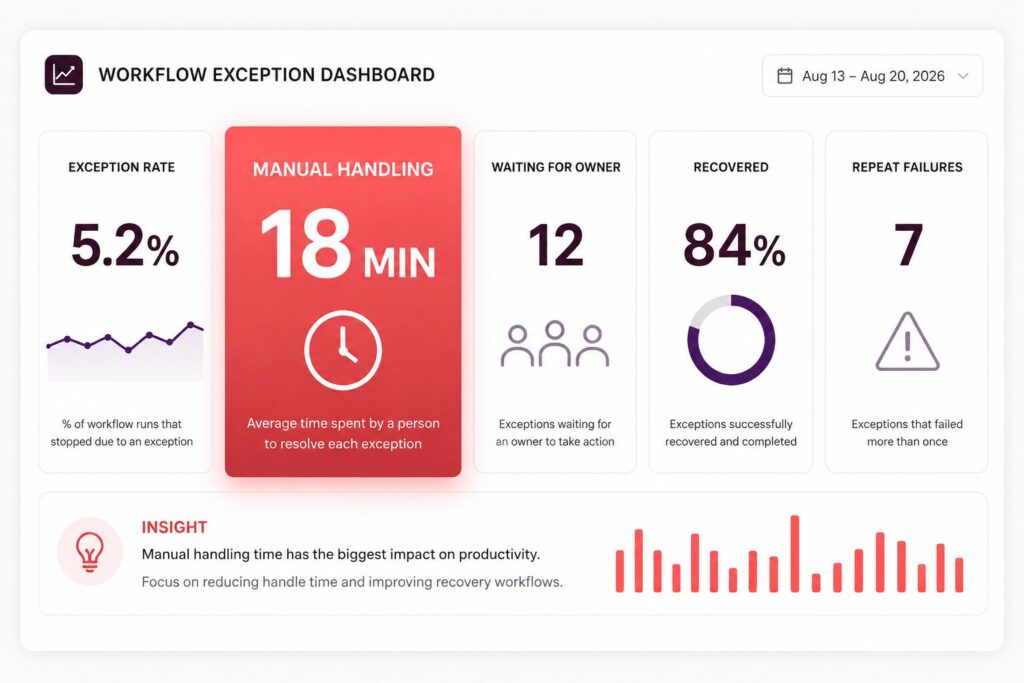
Useful for engineers. Incomplete for founders. Extend the view with measures tied to human repair work.
- Exception rate by workflow step and exception type.
- Manual handling time per exception.
- Age and volume of cases waiting for an owner.
- Retry rate and repeated failure rate.
- False escalation rate.
- Successful recovery rate and time to recovery.
- Duplicate records, sends, updates, or charges prevented.
- Recurring causes removed from the workflow design.
False escalation rate is the one most teams skip. A high rate means your rules send people work a retry would have cleared. Trust in the queue drops fast once people notice.
The last line is the one worth protecting. A workflow removing its own recurring causes gets cheaper every quarter. A workflow logging the same failure for a year is a manual process wearing a dashboard.
Why this matters: Manual handling time per exception turns an ops detail into money. Leadership teams act on money.
Want to Go Deeper on Workflow Exception Handling?
- Automation Readiness Audit: What to Fix Before Adding AI to Your Revenue System. The review to run before the build. Data quality, ownership, and process stability decide how many exceptions you will inherit later.
- Autonomous Workflows: How to Scale Without Adding Headcount. Where full automation earns its place, and which steps still need a person in the loop.
- Why Your CRM Reporting System Does Not Match Reality. The reporting gap behind hidden repair work. Useful once you start measuring exception volume.
Final Thought: Workflow Exception Handling Exposes the Real Work
Running the expected case without help does not make a workflow ready.
A workflow is ready when an unexpected case reaches the right person. The owner needs full context to fix it. The system needs enough control to stop further damage.
Success rate measures the easy half. The exception path decides whether the hard half costs you an afternoon or a quarter.
Before automating another workflow, map the exceptions still reaching your team. Book a Digital Growth Audit, and we will walk through one workflow with you, end to end.

Creativz.io
Creativz.io is a digital growth consulting firm that builds revenue infrastructure for B2B founders scaling from $500K to $10M ARR. The team architects conversion systems, CRM pipelines, lead-nurture automation, and analytics infrastructure that turn website traffic into predictable revenue. Creativz has worked across construction, SaaS, fintech, B2B services, and logistics, with a focus on systems that scale without scaling headcount.
