Would you build a new system for two missing rules?
For a small business, the build vs. buy AI automation decision starts with one workflow. Buy when a product meets your requirements with configuration. Extend your existing tools when they handle most of the work and need a few specific rules. Build when a requirement you need remains unmet, and someone has the time and skills to maintain the system.
Say your CRM already holds the signed deal. The kickoff checklist varies by service, and work must pause if payment approval is missing. Should you buy an onboarding tool, extend the CRM, or build a custom workflow? Start by following one signed deal through kickoff.
In this guide, you’ll learn how to choose an option, compare its full cost over 24 months, and test it before you commit.
What Does Your Current CRM Already Handle?
Start with the tools and rules your team already relies on. Trace a recent deal from signature to kickoff and note where the signed scope lives, who owns the next step, and what must happen before the team schedules the meeting.
To illustrate, suppose you run a B2B services firm without a full-time software engineer. Your CRM holds the deal and links to the signed scope. Delivery needs a different checklist for each service. If payment approval is missing, the workflow needs to pause and tell the onboarding owner what to resolve.
Write down three requirements before you compare proposals.
|
Requirement |
What the workflow must do |
|
Start from the signed deal |
Use the existing CRM record and link to the signed scope. |
|
Prepare the right kickoff tasks |
Use the service on the deal to select the checklist and assign it to the onboarding owner. |
|
Pause when approval is missing |
Hold the kickoff invite until the designated person records payment approval. Give the onboarding owner a clear next step while the deal waits. |
A signed agreement, a known service, and a payment approval status are structured inputs. Use rules to handle them. If sales leaves free-text notes, AI could help summarize them for delivery. Give someone responsibility for checking the summary before the team relies on it.
When Should You Buy, Extend, or Build?
Choose the option that meets your workflow requirements and fits the team responsible for running it. Gartner’s guide to deploying AI describes blending purchased tools with custom capabilities. In this onboarding example, that means keeping your CRM and adding rules to select the right checklist and hold the kickoff invite until payment is approved.
|
Option |
When it fits |
What to test in the onboarding example |
|
Buy an onboarding tool |
A product meets your requirements with configuration and connects to the CRM you use. |
Ask the vendor to run two deals with different services. Verify that the tool creates the right tasks and holds the kickoff invite when payment approval is missing. |
|
Extend your CRM |
Your CRM already holds the records and handles most steps. A small set of rules or integrations fills the gaps. |
Check whether the CRM or a connected tool can select the checklist, record approval, and tell the onboarding owner what needs attention. |
|
Build a custom workflow |
An essential requirement remains unmet after testing the available tools, and you have an owner and budget for ongoing support. |
Write down the requirement the other options failed to meet. Ask who will test changes, monitor failures, and repair integrations after launch. |
In this example, test extending the CRM first. The client record already lives there, and the work you need to add is concentrated in two places: selecting the right checklist and enforcing the approval rule. If a purchased tool handles both with less upkeep, buying could make more sense. If the process itself keeps changing, run it manually long enough to see which rules your team consistently uses.
What Will Each Option Cost Over Two Years?
Add setup, ongoing fees, and the time people spend running and maintaining the workflow. Use the same 24-month period and the same requirements for every option.
24-month cost = setup + 24 × monthly operating cost + one-time costs expected during the period
Setup includes configuration, migration, training, and testing. Monthly operating cost includes software, usage, maintenance, and staff time spent handling exceptions. Count new costs tied to the decision. If you’ll pay for the CRM under all three options, include only the extra CRM costs each option adds.
Here’s an illustrative comparison. The numbers show how to do the math.
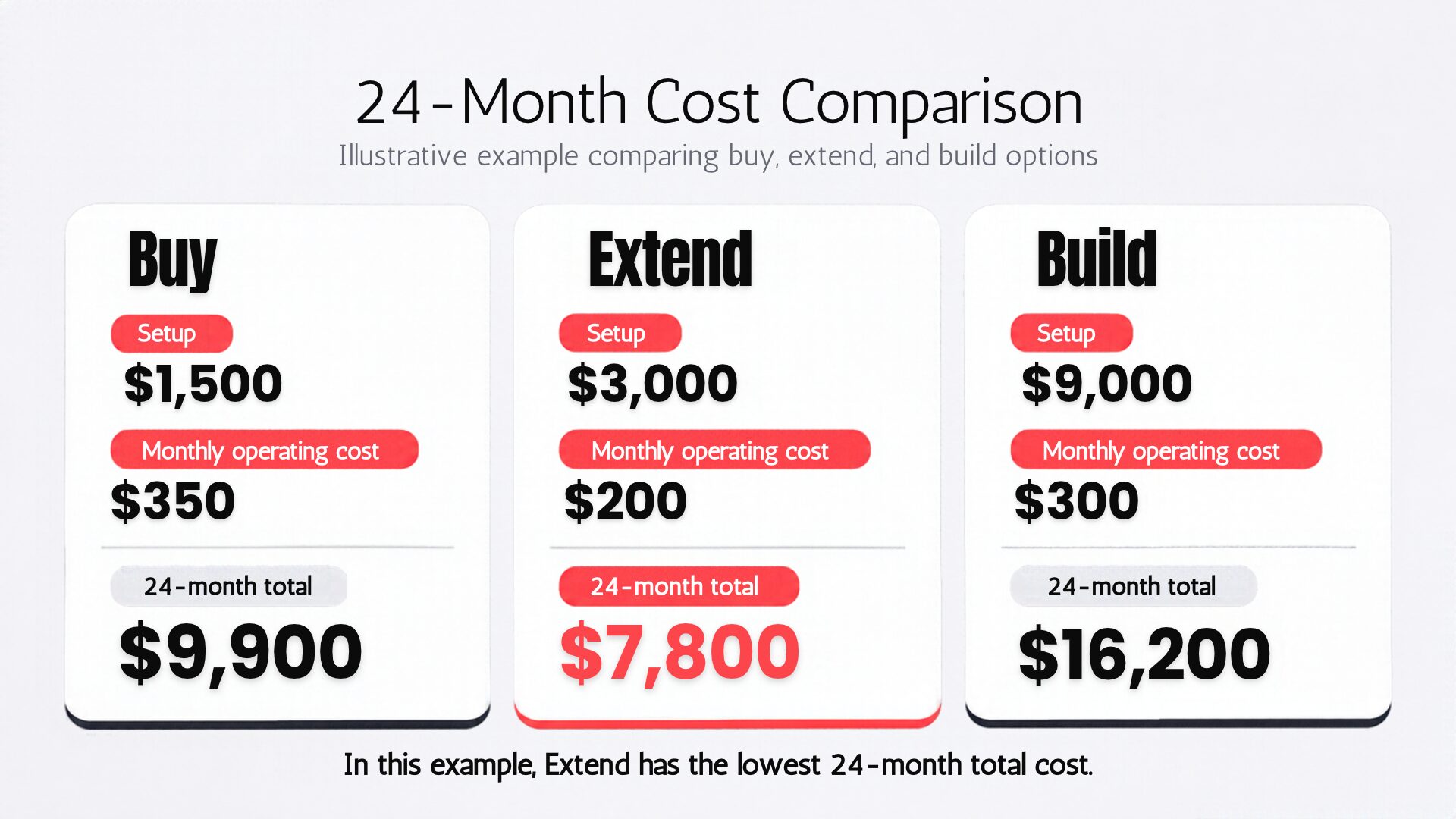
Extending comes in $2,100 below buying in this example. That difference is about $88 a month over two years. If extending takes an extra $100 a month in staff time beyond the estimate, its total rises to $10,200. Buying then costs less, assuming it passes the same tests.
When you ask for a quote, find out who pays if a CRM field changes and the workflow needs an update, or if the payment integration stops syncing. Use our breakdown of AI automation costs for small businesses to see where maintenance and support fit in your two-year estimate.
What Should You Test Before You Commit?
Run one standard kickoff and one kickoff with missing payment approval. Use sample records and check what the onboarding owner sees in each case.
-
Run the standard case. Mark a sample deal as signed with payment approved. Check that the right service checklist appears, the tasks go to the right owner, and the kickoff status reaches the CRM.
-
Run the exception. Leave payment approval blank. Confirm the workflow holds the kickoff invite and shows the onboarding owner what needs to happen next.
-
Resolve the exception. Record payment approval and confirm the workflow resumes once. Check for duplicate tasks or invites and make sure the CRM shows what happened.
Ask the person who will own onboarding to run these tests. If they need the implementer to tell them why a deal is waiting or how to restart it, account for that support before choosing an option.
Final Thought
Take your next signed deal and write down what needs to happen before kickoff. Use those requirements to test the tools you already have, then compare the cost of filling the gaps. You’ll have a basis for choosing what to buy, what to extend, and what deserves a custom build.
Creativz helps B2B teams map the workflow, compare implementation options, and test what happens when a step goes wrong. If you’re weighing a purchase or a custom build, start with a Digital Growth Audit.