
How to Set Up a CRM That Actually Closes Deals (For Founders Scaling Past $1M)
Your ad platform says 40 leads came in this week. Your CRM shows 12 were ever touched. Both numbers are right. As frustrating as that is, both numbers can be true. The real issue here is not your leads. It’s your CRM setup.
If you’re running a SaaS company doing $500K to $1M in ARR, this is one of the most common revenue leaks you can face. It’s usually not a bad product or a weak team. More often, it is a CRM that was never configured to actually help you close deals.
In this post, we will walk you through the exact 5-step CRM setup we use with scaling SaaS founders so you can fix that leak and build a pipeline you can actually trust.

What a Broken CRM Setup Is Actually Costing You
It is easy to treat a low-performing CRM as a minor inconvenience. In reality, it is a revenue problem.
SaaS companies lose an average of 20 to 30 percent of potential revenue to follow-up gaps and data silos. If your business is doing $1M ARR, that could mean $200K to $300K slipping away into a pipeline nobody fully trusts.
The HubSpot State of Sales report found that 40% of salespeople still use spreadsheets and manual methods to store customer data. That is not because people do not care. It usually means the system was never set up to support the team.
The speed cost is just as serious. Research from InsideSales shows that leads contacted within 5 minutes are 100 times more likely to convert than leads contacted after 30 minutes. If your CRM has no automation, every lead is left waiting for someone to notice them.
Your CRM is not just a contact list. It is the nervous system of your revenue engine. When it is wired incorrectly, important signals stop moving.
Why CRM Setup Matters More at $500K to $1M
At this stage, your margin for error quickly shrinks. You are generating enough leads that manual tracking starts to break down. You have enough people involved that inconsistency creates gaps. And you have enough revenue at stake that losing 20 percent really hurts.
Founders who grow past $1M are not always doing more marketing or pushing their sales teams harder. Often, they simply have a system that makes sure nothing slips through the cracks.
5 Signs Your CRM Setup Is Broken
Before you jump into the fix, take a moment to see how many of these are true in your business right now.
- No stage definitions. Deals move based on gut feel. One rep’s qualified is another rep’s not interested. Your pipeline becomes a graveyard of stale optimism.
- No automated alerts. Hot leads go cold over weekends because nobody is watching. You lose deals not because of a bad pitch, but because of silence.
- Random lead assignment. Leads go to whoever is available, not whoever is best suited to help. High-value accounts end up with junior reps who may not be ready to close them.
- No lead scoring. Your team spends the same amount of time on tire kickers and ready buyers. There is no system in place to protect where their attention goes.
- Stale data everywhere. Updating the CRM is manual, so it does not happen consistently. Reports are wrong. Forecasts feel like fiction. Nobody trusts the numbers.
If three or more of these are true, you do not have a CRM software problem. You have a setup problem. The good news is that it is fixable.
The 5-Step CRM Setup Framework for SaaS Founders
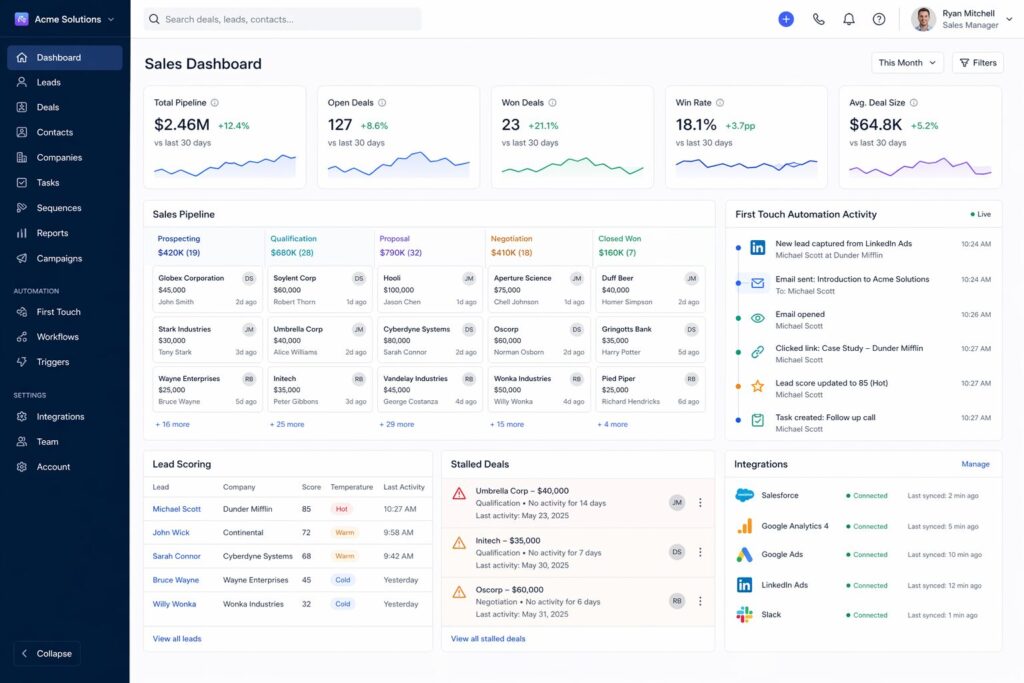
You do not need a new tool. Nearly every major CRM platform can handle everything below. In most cases, the gap is not the software. It is the configuration.
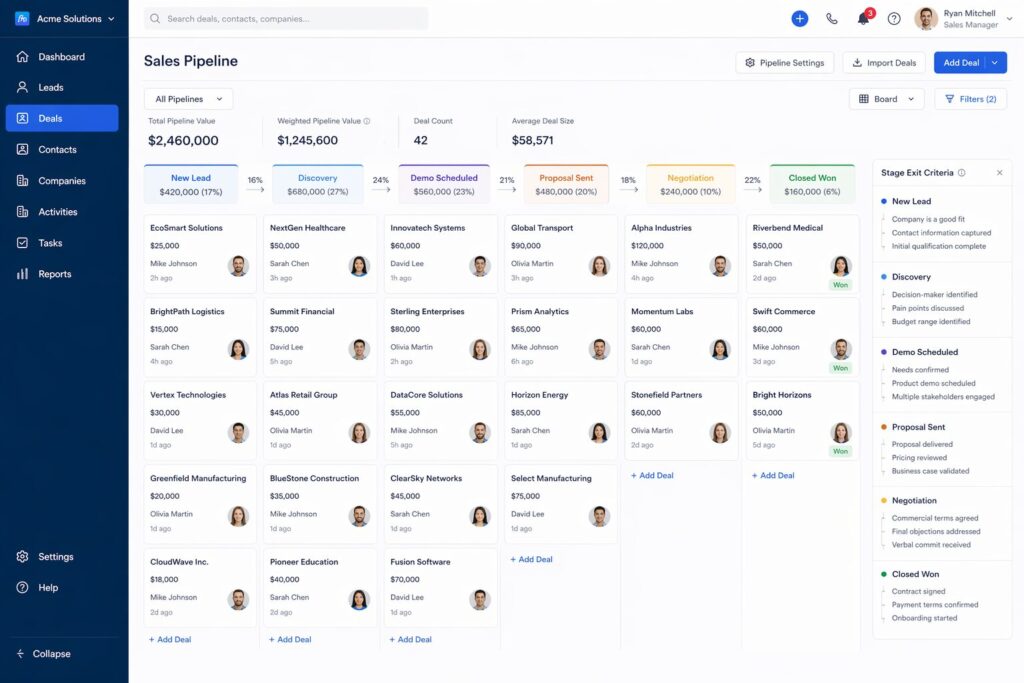
Step 1: Define Pipeline Stages With Exit Criteria
Most teams name their stages and stop there: Discovery, demo, proposal, close. But that is not a real pipeline. It is just a list of labels.
For each stage, define what must be true for a deal to enter it and what must be true for it to move forward.
- Discovery exists when the decision-maker is identified, the pain is confirmed, and the next step is agreed upon.
- Demo exits when the product is demonstrated against its specific use case, and all objections are logged.
- A proposal exists when pricing is reviewed, scope is agreed upon, and the buying timeline is confirmed.
Why this matters: Exit criteria create consistency for every rep on your team. When deals move the same way, your pipeline data becomes more reliable, and your revenue becomes easier to predict.
Step 2: Build a Lead Scoring System
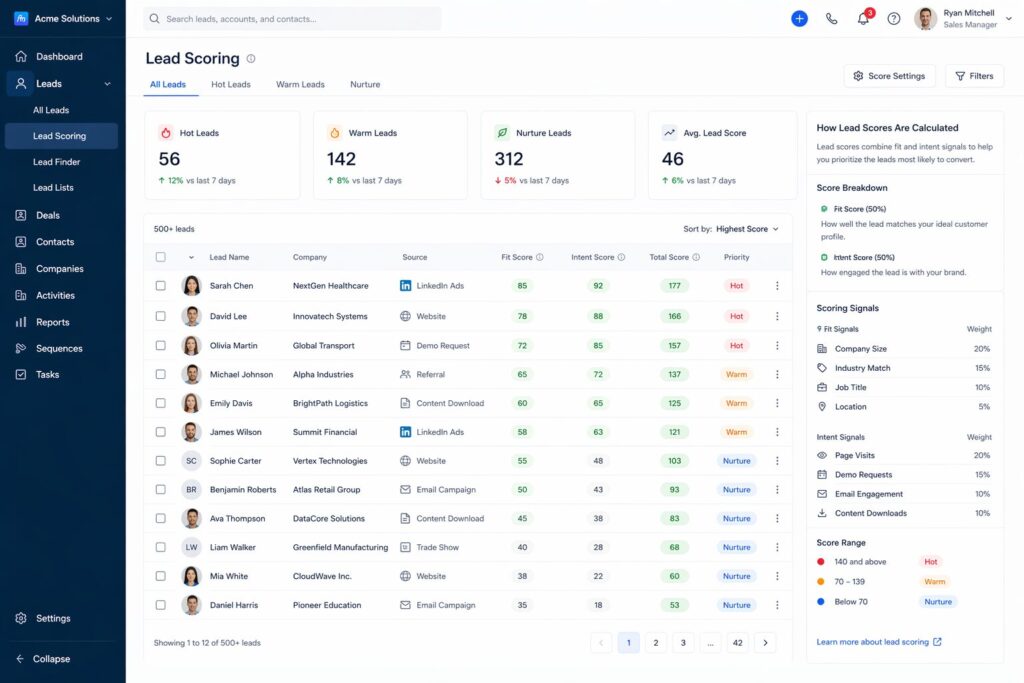
Not every lead needs the same level of attention. Lead scoring helps you focus on the people most likely to buy.
- Company signals: headcount, ARR range, industry fit, tech stack overlap
- Behavior signals: free trial usage, pages visited, pricing page views, webinar attendance
- Intent signals: demo requests, reply to outreach, opened email sequence 3 times in 24 hours
High-scoring leads should trigger immediate human follow-up. Lower-scoring leads can move into automated nurture sequences until they are ready.
Why this matters: Lead scoring helps protect your team’s time and energy. Without it, they end up treating cold prospects and ready buyers the same way. With it, they know where their next hour matters most.
Step 3: Automate the First Touch
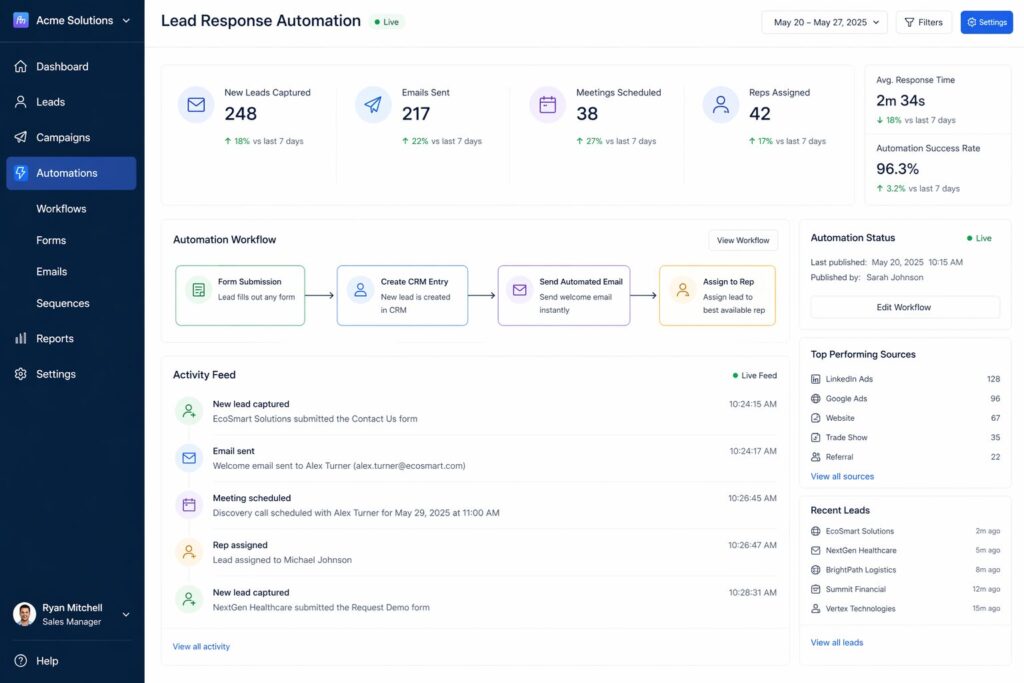
The moment a lead enters your CRM, a personalized first-touch email should go out automatically. Not a generic autoresponder. A message that reflects what the lead actually did.
- If they downloaded a guide: reference the guide topic and offer a clear next step
- If they booked a demo, confirm the time and share what they can expect
- If they filled out a contact form, acknowledged their question, and included a booking link
This automation supports you when your team is busy or offline. It also tells the lead right away that they are being heard and that your company is responsive.
Why this matters: InsideSales data shows conversion rates are 100 times higher when leads are contacted within 5 minutes. Automation is the only reliable way to make that happen consistently.
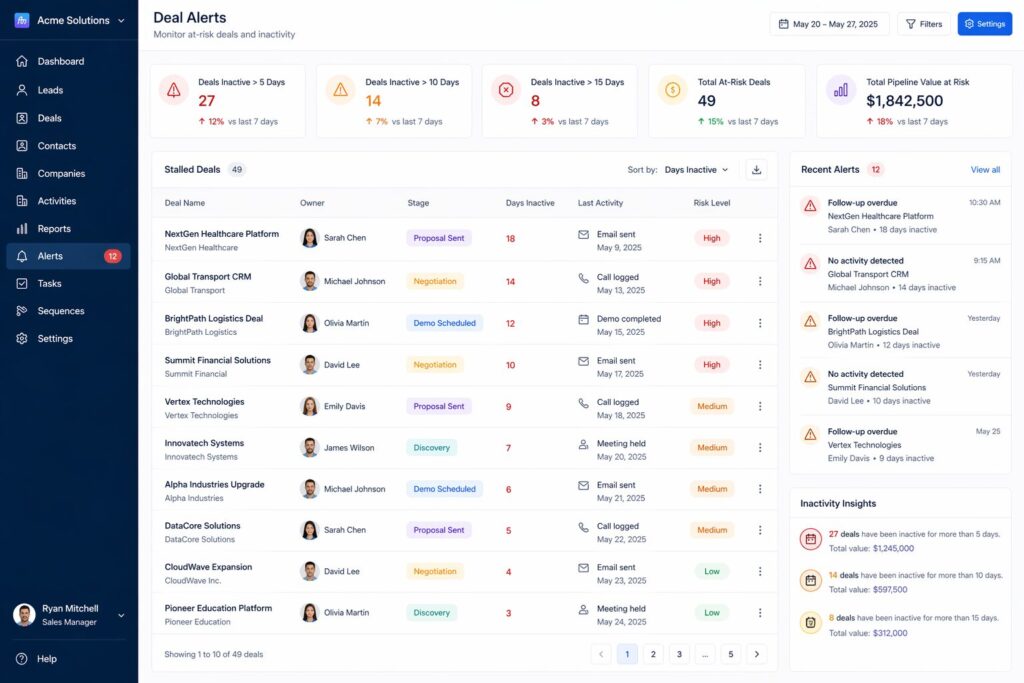
Step 4: Set Up Deal Inactivity Alerts
If a deal remains at the same stage for more than 5 business days without any activity, an alert should be sent to the deal owner and their manager.
Set this up in the channel your team actually pays attention to, whether that is Slack, email, or mobile push notifications. The tool matters less than making sure no opportunity goes cold quietly.
Why this matters: You cannot act on what you cannot see. Most deals are not lost during a conversation. They are lost in the silence between conversations, when no one realizes the follow-up has stopped.
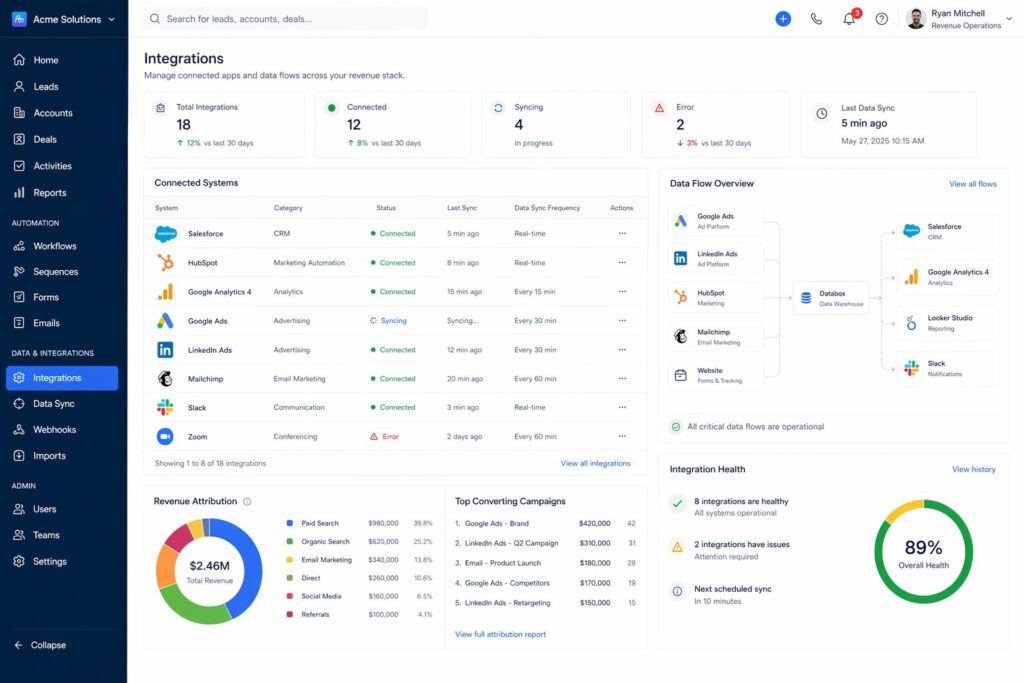
Step 5: Connect Your Stack
Your CRM should connect live to at least three systems: your marketing automation platform, your analytics platform, and your ad accounts.
- Marketing automation: so lead source and campaign data flow into each contact record automatically
- Analytics: so you can see which pages a lead visited before converting
- Ad accounts: so you can connect spend to closed revenue
Do not sync everything just because you can. Sync only what truly matters: lead source, campaign, last touch, and revenue attribution. Keep the data model clean so your team gets signal, not noise.
Why this matters: A connected stack gives you one source of truth. Marketing and sales stop blaming each other for lead quality. Finance can trust the forecast. Leadership can make decisions based on real data.
What This Looks Like in Practice
One SaaS founder with $800K ARR came to us with a CRM full of six months’ data that nobody trusted. Leads were being worked on or dropped based on whoever happened to check the inbox that day. There were no stage definitions, no automation, and no alerts.
Over three weeks, we rebuilt the pipeline. Stage names and exit criteria were defined. Lead scoring was configured around ARR potential and engagement signals. A first-touch automation went out within 5 minutes of every new lead. Five-day inactivity alerts were sent to the deal owner and CC’d to the founder.
The results after 60 days were clear: average response time dropped from 4 hours to 11 minutes. Close rate on qualified leads improved by 22 percent. And the founder was no longer the bottleneck in every deal because the system was finally carrying the process.
Broken CRM vs Connected CRM
| Feature | Broken CRM | Connected CRM |
| Stage definitions | Vague names, gut-feel movement | Clear exit criteria per stage |
| Lead assignment | Random or by availability | Rules-based, tied to fit score |
| First touch | Manual, hours or days late | Automated within 5 minutes |
| Deal inactivity | Nothing. Deals go cold silently | Alert fires after 5 days |
| Data accuracy | Manual entry, always stale | Synced across the stack in real time |
| Revenue forecast | Pipeline means nothing | Tied to buyer intent signals |
Want to Go Deeper?
- The Cost of Disconnected Tech Stacks—why syncing data across platforms is the foundation of a working revenue system.
- Revenue Infrastructure: Build Predictable B2B Growth — the full architecture behind a revenue system that scales.
- Why Fast Response Time Wins More Deals Than Better Marketing — the lead response data and what it means for your pipeline setup.
Frequently Asked Questions
What is CRM setup for startups?
CRM setup for startups is the process of configuring a customer relationship management system to match your company’s actual sales process. This includes defining pipeline stages with clear exit criteria, building lead-scoring rules, setting up automated follow-up sequences, creating deal-inactivity alerts, and connecting the CRM to the rest of your stack, such as email, analytics, and advertising platforms. A configured CRM is very different from an installed CRM. Many startups install a CRM and stop there, which is why the data feels unreliable, and the team does not use it consistently.
How do I know if my CRM setup is broken?
Your CRM setup is likely broken if deals move between stages without clear criteria, leads are assigned randomly instead of by fit or expertise, your team relies on memory or manual reminders to follow up, the data is often incomplete or outdated, or leadership does not trust the pipeline numbers. These are not tool problems. They are set up problems. They can occur in HubSpot, Salesforce, Pipedrive, and other platforms when the system is misconfigured.
What is the right CRM for a SaaS company under $1M ARR?
The right CRM is the one your team will actually use consistently. For SaaS companies under $1M ARR, HubSpot and Pipedrive are common choices because they offer solid native integrations, automation on entry-level plans, and setup that usually does not require a developer. But the bigger decision is not the platform. It is how you configure it. A well-configured Pipedrive will outperform a poorly configured Salesforce every time. Start with your pipeline stages, lead scoring, and automation before worrying too much about the tool’s logo.
How long does a CRM setup take?
A basic CRM setup that includes stage definitions, lead scoring, first-touch automation, and inactivity alerts usually takes two to three weeks if someone is focused on it. More advanced setups with custom scoring models, multi-tool integrations, and deeper reporting can take four to six weeks. The key is not to overbuild the first version. Start with the minimum setup that closes your biggest revenue leaks, get it live, and improve it from there.
Why does my sales team not use the CRM?
Sales teams usually avoid the CRM when it feels like extra admin work with no real benefit to them. The fix is to make the CRM useful for the rep, not just the manager. That means automating data capture so reps don’t have to log every touch manually, limiting required fields to what actually matters, and building dashboards that help reps understand and manage their own pipeline. When the CRM helps someone close deals faster rather than just reporting better, adoption improves naturally.
What is the difference between a CRM and a revenue system?
A CRM is a tool for tracking contacts and deals. A revenue system is the overarching structure that connects marketing, sales, and customer success into a single, coordinated funnel. Your CRM is one part of that system, but the system also includes lead generation, nurture automation, analytics, attribution, and the processes that govern how leads move from one stage to the next. A CRM without a revenue system behind it is just a database. A revenue system without a properly configured CRM has no operational backbone.
Final Thought
If your CRM is not helping you close deals, it is easy to assume the software is the problem. But in most cases, it is really about discipline, clarity, and design.
When you set up your CRM deliberately, by defining stages with exit criteria, scoring leads by fit and intent, automating the first touch, setting inactivity alerts, and connecting your stack. You give your team a better system to work with. That means fewer missed opportunities, more trust in your pipeline, and more of the deals already in front of you actually getting closed.
The system is what scales, not the software.
If you want to see exactly where your revenue system may be leaking, start with our Revenue System Scorecard. It covers all six growth areas in under 10 minutes and shows you which one may be costing you the most right now.
If you would like a second set of eyes on your full setup, book a Free Digital Growth Audit. We will walk through all six areas with you and provide a prioritized fix list tailored to your specific business.
