
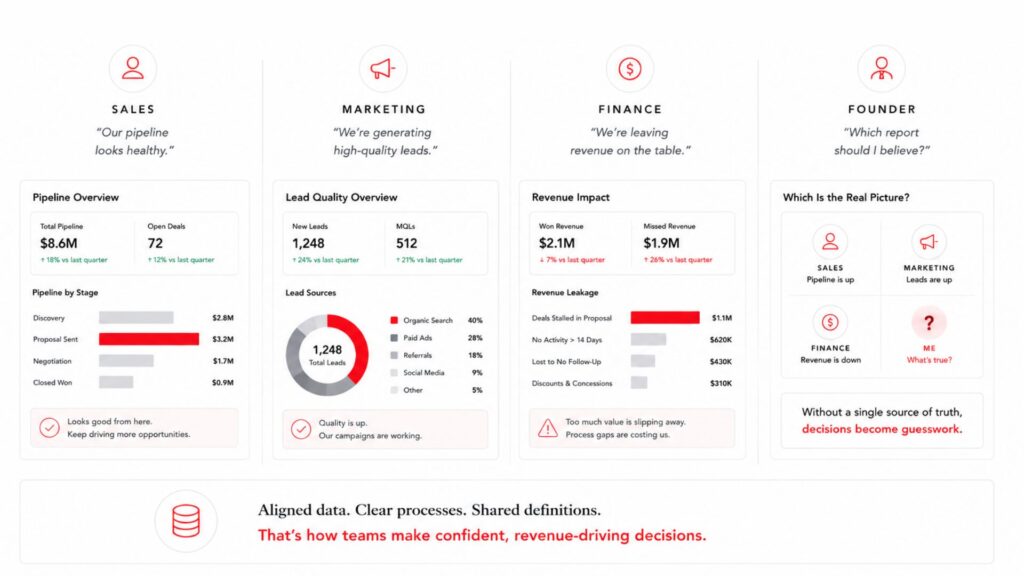
A founder opens the CRM on Monday morning. The pipeline looks healthy. Sales says the deals feel colder than reported. Marketing insists the leads meet the ideal profile. Finance sees revenue already missing this quarter’s forecast.
Four leaders now read four realities from the same screen. This is the CRM reporting system problem, not a dashboard issue.
Most reporting failures trace back to the system feeding the report. Bad inputs produce numbers nobody trusts. Clean inputs produce numbers founders can safely bet on. Fix the system so the dashboard stops arguing with the room.
Here is the uncomfortable truth. The CRM tool itself usually works. The behind-the-scenes wiring does not. Founders keep buying software to patch a process gap. The gap stays. The reports keep arguing with reality.
This post shows why trust erodes, what a real CRM reporting system includes, and how founders can start fixing it.

What Is a CRM Reporting System?
A CRM reporting system turns raw sales activity into reports founders trust. Dashboards show numbers. Reporting systems decide which numbers earn belief.
Think of the difference this way. A dashboard reports. A CRM reporting system explains. One shows where things stand. The other shows what to do next.
A CRM reporting system connects these moving parts:
- Data entry rules every rep follows
- Clear lifecycle and deal stage definitions
- Lead source tracking with real detail
- One owner per deal
- Follow-up activity logs
- Closed-won and closed-lost reasons
Each part shapes the output. Drop one, and the report drifts from reality.
A CRM reporting system is a process, not a piece of software. No tool fixes behavior the process never defined.
Why this matters: software promises clean reports. Only a defined process delivers them.
Why Founders Stop Trusting CRM Reports
Trust breaks for reasons every operator recognizes:
- Reps update deal stages late, so the pipeline trails real life.
- Sales notes go missing, so the team loses context.
- Lead sources say “website,” so campaigns stay invisible.
- Closed-lost reasons stay blank, so patterns hide.
- Pipeline value inflates, because optimism beats evidence.
- Forecasts rest on hope instead of behavior.
The numbers are not lying to you. The report mirrors the mess inside the process.
Founders feel this gap early. Gartner estimates that poor data quality costs 12.9 million dollars a year for the average organization. Fewer than half of sales leaders trust their forecast accuracy, according to the same study.
Bad data drags the wider economy too. Harvard Business Review put the yearly hit to the United States near 3.1 trillion dollars.
The trust gap is common, not rare. In one Salesforce study, 68 percent of sales leaders called their forecasts unreliable. Reliable numbers are the exception, and every operator feels it.
Why this matters: a founder making decisions on shaky data makes shaky decisions.
A CRM Dashboard and a CRM Reporting System Are Not the Same
People confuse the two, and the confusion stays expensive.
A dashboard says:
- 48 open deals
- 420,000 dollars in pipeline
- 22 new leads
- 9 proposals sent
A CRM reporting system shows something sharper:
- Which deals are real
- Which leads are qualified
- Which proposals need follow-up today
- Which source produces revenue
- Which stage slows the sale
- Which owner needs support
Numbers describe the past. A reporting system points to the next action. That difference decides whether the founder trusts the screen.
Buying a better tool speeds the refresh. Faster refresh is not deeper trust. Trust comes from behavior upstream, not from the screen.
Six Signs Your CRM Reports Are Not Decision Ready
Run this quick self-check against your own pipeline. Each sign points to a broken input, not a broken tool. Read them as a diagnosis, not a scoreboard.

1. Pipeline looks full while revenue stays flat
Stale deals bloat the number. The pipeline reads busy, and the bank account disagrees.
2. Lead source says "website" too often
One vague label hides the campaign, page, referral, or post behind every deal. You lose the map to your best channels.
3. Closed-lost reasons stay empty
Without a reason, no one sees why deals slip. Patterns repeat because nobody named them.
4. Stages mean different things to different reps
One rep marks “qualified” after a form fill. Another waits until after a call. Now the report mixes two definitions and trusts neither.
5. Follow-up activity stays invisible
If no one sees whether follow-up happened, no one trusts the pipeline. Silent gaps look like healthy deals.
6. The forecast shifts with whoever updated last
A forecast built on behavior, not rules, moves for the wrong reasons. Consistency dies, and confidence goes with it.
What to Fix Before You Build Another CRM Report
More charts will not rescue weak inputs. Fix the feed first.
Define every sales stage. Give each stage one clear entry rule. A deal reaches “proposal sent” only after the proposal is sent and logged.
Standardize required fields. At minimum, capture lead source, owner, stage, next step, expected close date, lost reason, and service interest.
Set pipeline hygiene rules. Keep them simple and enforced:
- No deal sits untouched for 14 days.
- No closed-lost deal lacks a reason.
- No proposal stage lacks a follow-up task.
- No lead lacks a source.
Track sales activity. Surface calls, emails, follow-ups, and next steps inside the report.
Split activity from revenue. Treat activity as separate from revenue. Measure both, and never confuse the two.
Build a weekly review rhythm. A report earns value only when the team reviews and acts on it. According to Validity’s 2025 State of CRM Data Management report, 76 percent of organizations say less than half of their CRM data reads as accurate and complete. Weekly discipline keeps your data on the right side of that line.
Picture one common fix in action. A team defines “qualified” as budget confirmed plus a booked call. Overnight, the pipeline shrinks and sharpens. The forecast drops, and finally it matches what closes. Nothing changed in the market. Only the definition changed, and the report started telling the truth.
New to this? Build the foundation first. Our guide on How to Set Up a CRM That Actually Closes Deals walks through it.
What Founders Should See in a Trusted CRM Report
A trusted report answers questions a founder asks out loud:
- Where did qualified leads come from?
- Which deals are stuck?
- Which deals will likely close?
- Which deals have no next step?
- Which source creates the most revenue?
- Which stage slows the sales cycle?
- Which follow-ups are overdue?
- Why are deals being lost?
A trusted CRM report not only shows performance. It shows where to act next.
Attribution sits underneath most of these answers. Our breakdown of Marketing Attribution for Startups shows how to trace revenue back to its real source.
Why this matters: answers drive action, while raw counts drive meetings about raw counts.
Where Automation Fits Into CRM Reporting
Automation earns its place after the rules exist, not before. Order the work correctly, and the gains compound.
Automation helps you:
- Tag lead sources at the point of entry
- Assign owners the moment a lead lands
- Create follow-up tasks automatically
- Flag stale deals before they rot
- Send proposal reminders on schedule
- Alert the founder when pipeline risk climbs

One warning holds above all others. Automating bad reporting does not create clarity. Automation creates faster confusion.
Speed multiplies whatever it touches. Point it at a clean process, and reporting sharpens. Point it at chaos, and chaos scales.
Sequence the work in the right order. Rules come first. Clean data comes second. Automation comes last, once the parts humans repeat become clear. Skip the first steps, and automation locks the mess in place.
Why CRM Reporting Breaks as You Scale Past 1 Million
Early on, the founder holds the system in their head. You know which deals are real. You remember who followed up. You recall which channel sent the lead.
Then the business grows, and memory stops scaling. More reps, more deals, and more channels overwhelm any one person’s recall.
Past a certain point, the company needs reporting no longer tied to the founder asking everyone for updates. A CRM reporting system replaces the memory with structure.
The founders who build this early stop guessing sooner. Structure buys back the clarity growth quietly took away.
Watch for the tipping point. Around 15 or 20 people, informal updates stop reaching the founder. Deals move without anyone logging the reason. The founder senses drift and cannot name the source. A reporting system names it before the quarter ends.
Reporting failures often hide a deeper drag. See The Hidden Cost of Slow Business Decision-Making Systems for the compounding effect on the whole company.
Who Owns the CRM Reporting System?
Reporting fails when ownership stays vague. Everyone touches the CRM, so no one guards it.
Split the responsibility clearly:
- Reps own accurate entry at the deal level.
- Sales leaders own the number and the judgment calls.
- Operations owns the rules, the fields, and the hygiene.
One team must own the definitions. Without a single owner, stages drift and standards fade. The report inherits the drift.
Why this matters: a system with no owner becomes everyone’s blind spot.
Assign the owner before you assign the dashboard.
A CRM Reporting Audit Checklist
Score your reporting system against these eight areas.
| Area | Question to ask |
| Stages | Does every sales stage carry a clear definition? |
| Sources | Do you know where every qualified lead came from? |
| Ownership | Does every deal carry one owner? |
| Next step | Does every open deal carry a next action? |
| Follow-up | Does the team see whether follow-up happened? |
| Lost reasons | Do you know why deals are lost? |
| Forecast | Do you trust the projected revenue number? |
| Review rhythm | Does the team clean the report weekly? |
Eight yes answers mean your reporting system reflects reality. Any no marks the first place to rebuild. Work the no answers in order of revenue impact. Sources and stages usually move the number fastest.
Want to Go Deeper?
Three internal reads extend the ideas above:
- How to Build a Lead Scoring System for Startups shows how clean inputs feed better prioritization.
- Revenue Infrastructure: Build Predictable B2B Growth frames reporting inside the larger system.
- Digital Growth Audit: How to Audit Your Business in 90 Minutes walks the full diagnostic step by step.
Final Thought
A CRM dashboard will never outperform the system feeding it. Late, vague, or inconsistent data keeps the report unreliable no matter how the charts look.
Founders do not need more charts. You need a CRM reporting system showing what is real, what is stuck, and what needs action.
Start with the inputs. The trust follows.
Ready to find where your reporting breaks? Book a Digital Growth Audit and map your CRM reporting system end to end.
Prefer to check your own numbers first? Use the Revenue System Scorecard to see whether your revenue data reads as decision ready.

Creativz.io
Creativz.io is a digital growth consulting firm that builds revenue infrastructure for B2B founders scaling from $500K to $10M ARR. The team architects conversion systems, CRM pipelines, lead-nurture automation, and analytics infrastructure that turn website traffic into predictable revenue. Creativz has worked across construction, SaaS, fintech, B2B services, and logistics, with a focus on systems that scale without scaling headcount.
