
On September 14, 2026, Anthropic launched Claude for Financial Advisors, according to Reuters.
The headline announced a new industry version of Claude. The more useful story sits in the connections.
Reuters names BlackRock, Charles Schwab, Addepar, Envestnet, iCapital, Orion, Wealthbox, Wealth.com, and Zocks among the connected providers.
Reuters says the tool helps with client meeting prep, portfolio reviews, and follow-up work.
This is AI workflow automation for professional services in practice.
A general AI assistant waits for a person to gather facts and carry the result into the next system.
A connected workflow gets approved context and completes a set task. Then the workflow routes judgment calls to the right person, records the result, and starts the next step.
The lesson reaches far beyond finance. Consulting firms, agencies, accounting firms, and recruiters face the same problem.
Each firm needs AI placed inside one client workflow, with trusted data, clear owners, and a measured finish. Performance depends on the full system around the model.
In this blog, you will learn what a connected workflow contains. You will also get the Connected AI Workflow Map, a first-workflow test, a measurement plan, and a readiness checklist.

What Is AI Workflow Automation for Professional Services?
AI workflow automation for professional services connects AI to the systems, rules, and people behind one defined client task.
Those systems often include the CRM, files, calendars, project tools, and trusted data. The model handles only the steps you assign. People still make the key calls and own the result.
A good rollout starts with one workflow and one clear measure. A broad promise to automate the whole firm rarely produces a result anyone is able to check.
Two terms separate casual AI use from operating design.
A one-off AI task happens when a person opens an assistant, pastes context, and copies the answer somewhere else.
A repeatable AI workflow starts from a set trigger and pulls trusted context with no copy and paste. The workflow then records the approved result in the right system and assigns the next step.
The finish is a verified business outcome. A draft sitting in a chat window has not reached the finish yet.
Why this matters: An AI tool produces an output. An AI workflow moves a set job through context, decisions, systems, owners, and a final check.
What the Claude for Financial Advisors Launch Shows
Anthropic calls the release a set of connectors and workflow skills for research, prep, and paperwork.
Connectors pull client data from custodians, portfolio tools, CRMs, and planning software. Skills apply the information to specific moments in an adviser’s day.
Two documented skills show the pattern clearly.
- Pre-meeting prep pulls holdings, recent account activity, and open items from prior meetings into one brief for review.
- Post-meeting notes and follow-up turns a transcript into a client summary, a recap email, and CRM tasks.
The announcement also describes where people stay involved. Anthropic says the adviser stays in control and must approve key tasks.
Claude stages CRM updates and draft client messages for adviser review and approval. Investment advice, client messages, and compliance decisions still go to a person for review.
Anthropic frames the problem in terms of time. The company cites Kitces research showing advisory practices spend only a sixth of their time in client meetings.
The rest goes to prep, planning, and paperwork around those meetings. Many service firms will recognize a similar split.
This article does not review the product or claim results for the launch. The launch matters as a sign of where the market is heading.
AI products are moving closer to the records and tasks where client work happens.
The model is one part of the launch. The connections, skills, and review points carry the operating value.
Why a Model Alone Does Not Complete Client Work
Consider an account lead at a consulting firm preparing for a Thursday client meeting with a general assistant.
The assistant writes a good brief. The work around the brief still falls to the account lead.
- Find the latest CRM notes, project status, and open actions.
- Copy the context into the assistant.
- Check the output against the source records.
- Update the CRM after the meeting.
- Create follow-up tasks and assign owners.
- Remember to send the recap.
Six manual steps surround one generated draft. The assistant saved writing time, yet the workflow still runs on memory.
Each copy and paste also adds risk. A stale note or a missed field enters the brief without warning.

Context breaks down across separate tools for a simple reason. Disconnected tech stacks force your people to act as the integration layer.
Large AI providers describe the same gap. OpenAI says real impact also needs workflow redesign, linked systems and data, and change management.
Adoption data points the same way. McKinsey reports 62 percent of companies are testing AI agents.
Only 23 percent report scaling an agentic AI system somewhere in the enterprise.
A good draft leaves the workflow unfinished. The finish requires trusted context, a human decision, a system action, and a completion check.
Why this matters: A good draft and a finished job are two different things. Most of the manual effort in your firm sits between the two.
How the Connected AI Workflow Map Works
Creativz designs AI workflows with the Connected AI Workflow Map. The map has seven parts, and each part answers one question.
The walkthrough below follows one job from start to finish. The job is meeting prep at a consulting firm
1. Trigger
The work starts when a client meeting lands on the calendar. The event is specific, frequent, and simple to detect.
A vague trigger, such as “whenever the team needs a brief,” produces inconsistent runs and missed meetings.
2. Trusted context
The workflow pulls CRM history, prior meeting notes, account data, and approved documents.
Each source needs a reason to be there. Pull only what the brief requires, from systems your team already trusts.
Stale or conflicting records go to a person for review. The model should never guess which version is correct.
3. Assigned AI task
The model builds a meeting brief and lists open follow-ups from the last call.
The task has a narrow input, a narrow output, and one purpose. Broad instructions produce broad errors.
4. Decision boundary
The account lead checks the advice, the tone, the priorities, and any odd cases before the brief moves.
This review step is part of the design from day one. Review keeps expert calls with the experts.
5. System action
After approval, the workflow updates the CRM, creates tasks, and drafts the client message.
The approved result lands in the system of record. Nobody retypes the brief or the action list later.
6. Outcome check
The workflow confirms the account lead reviewed the brief. Each agreed follow-up needs an owner in the CRM.
A data sync alone does not prove the job is done. The outcome check does.
7. Performance signal
Track prep time, missing context, next-step delay, and corrections. Compare each figure with the numbers from before launch.
One boundary keeps the map honest.
Apps sharing data does not make a workflow connected.
Each data hand-off needs a reason, a trusted source, a named owner, and a check on the result.
Why this matters: The map lets you design one client job before you choose a model or an automation platform.
AI Workflow Automation for Professional Services: Five Workflows Worth Evaluating

The examples below show common patterns. They are not documented client deployments or measured results.
Look at the ownership column first. In every example, a person keeps the advice and the words the client sees.
Three more workflows deserve a place on your evaluation list.
- Client intake. Form or call data creates the record, flags missing details, and routes the file to an owner.
- Proposal preparation. Discovery notes and approved pricing rules feed a first draft for the account lead to edit.
- CRM updates after calls. Notes become structured fields and tasks, with a person approving anything client-facing.
None of these examples hands legal, medical, financial, or strategic calls to AI alone.
Once one pattern works, the same logic extends to other recurring jobs. Our guide to autonomous workflows shows how repeat work scales across linked systems.
Where People Stay in Control
People own every call with real risk for the client or the firm. In most firms, the list looks like this.
- Advice and recommendations
- Negotiation, pricing, and scope exceptions
- Approval of client-facing messages
- Sensitive or difficult communication
- Conflicting or missing records
- Nonstandard client requests
A review step belongs in the operating design from the start. Human review signals a sound build.
Every handoff needs full context and a named next owner. The reviewer should see the source records, the draft, open questions, and the recommended next step.
A handoff without context sends the reviewer back to rebuild the work by hand.
Permission limits matter here too. Our guide to AI agent governance covers access, sign-off, and rollback.
Public guidance supports the same principle. The NIST AI Risk Management Framework puts oversight and clear roles under Govern, one of four core functions.
Why this matters: AI workflow automation for professional services cuts the busywork around expert work. Your people keep the expert work and own the result.
How to Build the First Connected AI Workflow
Six steps take one workflow from idea to a controlled pilot.
- Map all seven parts of the workflow, from trigger to performance signal.
- Cut repeat steps before you automate. Automated waste still wastes time.
- Connect only the sources and targets the job needs.
- Test on historical examples first, then on live examples under human review.
- Assign one operating owner and one backup owner.
- Run a controlled pilot before a wider rollout.
Step three answers a common question. Which systems need to connect?
The answer is only the sources and destinations the job uses. For most firms, the list includes the CRM, documents, calendar, project system, and approved data.
Step five matters more than most teams expect. Workflows break during holidays, staff changes, and vendor updates.
A backup owner keeps the workflow running when the primary owner is away.
Budget belongs in the plan too. Our breakdown of AI automation cost for small business walks through the eight cost layers.
Why this matters: A pilot with human review gives you proof. The proof decides whether the workflow earns a wider rollout.
How to Measure AI Workflow Automation for Professional Services
Measure the client job. AI activity alone tells you nothing about business results.
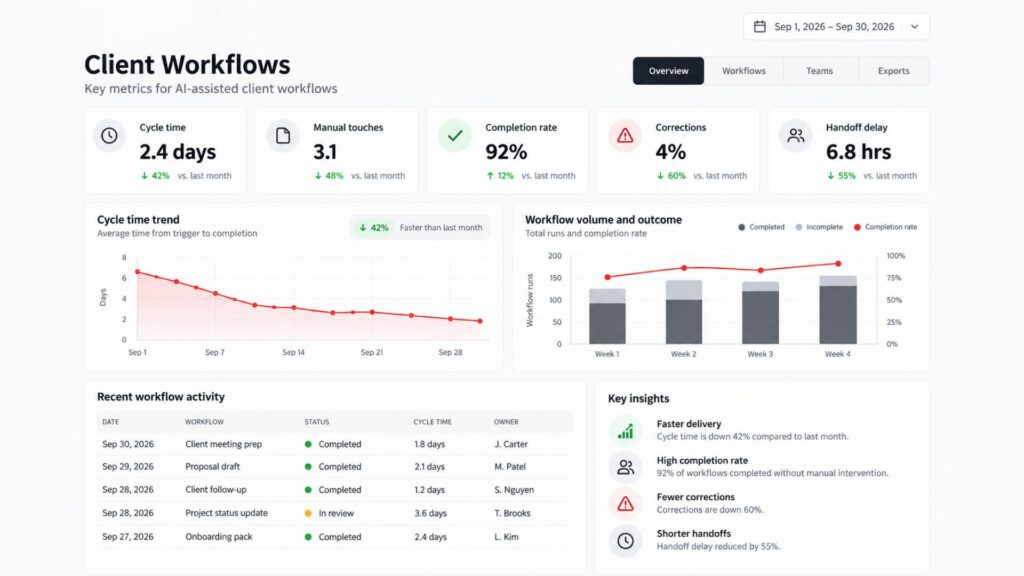
Prompt counts, summary counts, and AI minutes do not prove business value.
Your metric should confirm the client job moved faster, needed less repair, or reached the next step more often.
Compare every signal with the baseline from before launch. Without a baseline, any gain is a guess.
Pick one primary metric for each workflow. Track the other signals as supporting evidence.
Why this matters: Leadership teams fund results they see. A before-and-after comparison on one workflow makes the case for the second.
Common Mistakes in AI Workflow Automation for Professional Services
Most failed projects repeat a small set of errors.
- Starting with a vendor. The tool choice arrives before anyone defines the client job.
- Connecting every system at once. Scope grows before one workflow proves value.
- Treating a draft as finished work. The draft exists, and the CRM stays empty.
- Leaving ownership unclear. Judgment, exceptions, and records fall between people.
- Measuring usage. Adoption charts rise while cycle time stays flat.
Each mistake pulls attention away from the finish line. Fix the ownership gap first, since the other errors depend on the same missing owner.
AI Workflow Automation for Professional Services Readiness Checklist
Review one workflow against these ten points. Any unchecked line needs an owner before launch.
- One client workflow is named and bounded.
- The start and the checked finish are written down.
- Each data source and target system the job needs is listed.
- The AI task has a narrow input, output, and purpose.
- A named person owns each judgment call, approval, sensitive message, and odd case.
- The system records every approved action in the proper place.
- The next step starts with no reliance on memory or double entry.
- The workflow has a baseline and one primary business metric.
- A small pilot runs before a wider rollout.
- A person owns review, upkeep, and changes after launch.
With this list, you have enough to map one client job before you speak to a single vendor.
Want to Go Deeper on AI Workflow Automation for Professional Services?
- Automation Readiness Audit: What to Fix Before Adding AI to Your Revenue System. Run this review before the build. Written processes and clean data decide how well the first workflow runs.
- AI Agent Governance: How to Set Permission Boundaries Before Production. Set limits on access, sign-off, and rollback before a workflow touches live client data.
- AI Automation Cost for Small Business: What a Working System Costs in 2026. Price one workflow across all eight cost layers before you commit budget.
Final Thought
Return to the September 14 launch.
Anthropic did not present Claude as a separate chat window beside advisory work. The company linked the model to the data and software around set client tasks.
Adviser review stayed inside the design. The model prepared the work, and the professional kept the decision.
Your firm should apply the same idea on a smaller scale.
Pick one measurable client workflow and connect only the systems the job requires.
Map the first client workflow worth connecting. Book a Digital Growth Audit with Creativz. Together we will define the trigger, systems, AI task, human ownership, and business outcome.

Creativz.io
Creativz.io is a digital growth consulting firm that builds revenue infrastructure for B2B founders scaling from $500K to $10M ARR. The team architects conversion systems, CRM pipelines, lead-nurture automation, and analytics infrastructure that turn website traffic into predictable revenue. Creativz has worked across construction, SaaS, fintech, B2B services, and logistics, with a focus on systems that scale without scaling headcount.
