
Your team uses a CRM, a few spreadsheets, a scheduling platform, and a reporting dashboard.
Each tool does its part. Your people still copy customer details between systems, chase approvals by email, and check by hand whether tasks got done.
So what do you need? A new application? A different platform? Or a better way to connect the tools you already pay for?
Custom software development solutions make sense when your current tools fail to support a business-critical requirement without heavy workarounds. Building new software is not always the right call for you.
Sometimes an existing product already does the job. Sometimes your tools work fine, and the connections between them are the problem.
Your real decision is whether to build custom software, buy an existing product, or integrate the tools you already use.
In this guide, you will get:
- A side-by-side comparison of build, buy, and integrate
- The questions to ask about fit, cost, and ownership
- Two scenarios showing when each option fits
- A workflow test to run on any vendor or developer before you sign
What Are Custom Software Development Solutions?
Custom software development solutions are applications, platforms, or digital systems built around your specific business requirements.
Off-the-shelf software serves a broad customer base. Custom software supports your specialized workflows, data structures, and operating rules.
Common examples include:
- Custom quoting applications
- Customer portals
- Internal business platforms
- SaaS products
- Software connecting your existing systems
Custom work does not always mean a brand-new application.
Your project might be a focused component, an extension of a platform you already use, or an integration handling a process your standard tools fail to support.
What are we comparing?
For this guide, we’ll evaluate three approaches.
Build: Develop a custom application or component around defined requirements.
Buy: Purchase or subscribe to an existing software product and configure it for the business.
Integrate: Connect existing applications or extend their capabilities without replacing the entire system.
The comparison focuses on business applications, internal operations, and customer-facing software.
It does not rank development agencies or compare specific software products. Product prices and implementation costs vary by provider, contract, usage, and scope.
Build vs. Buy vs. Integrate: How Do They Compare?
Your right choice depends on your workflow, the implementation effort, long-term cost, ownership, and the technology you already run.
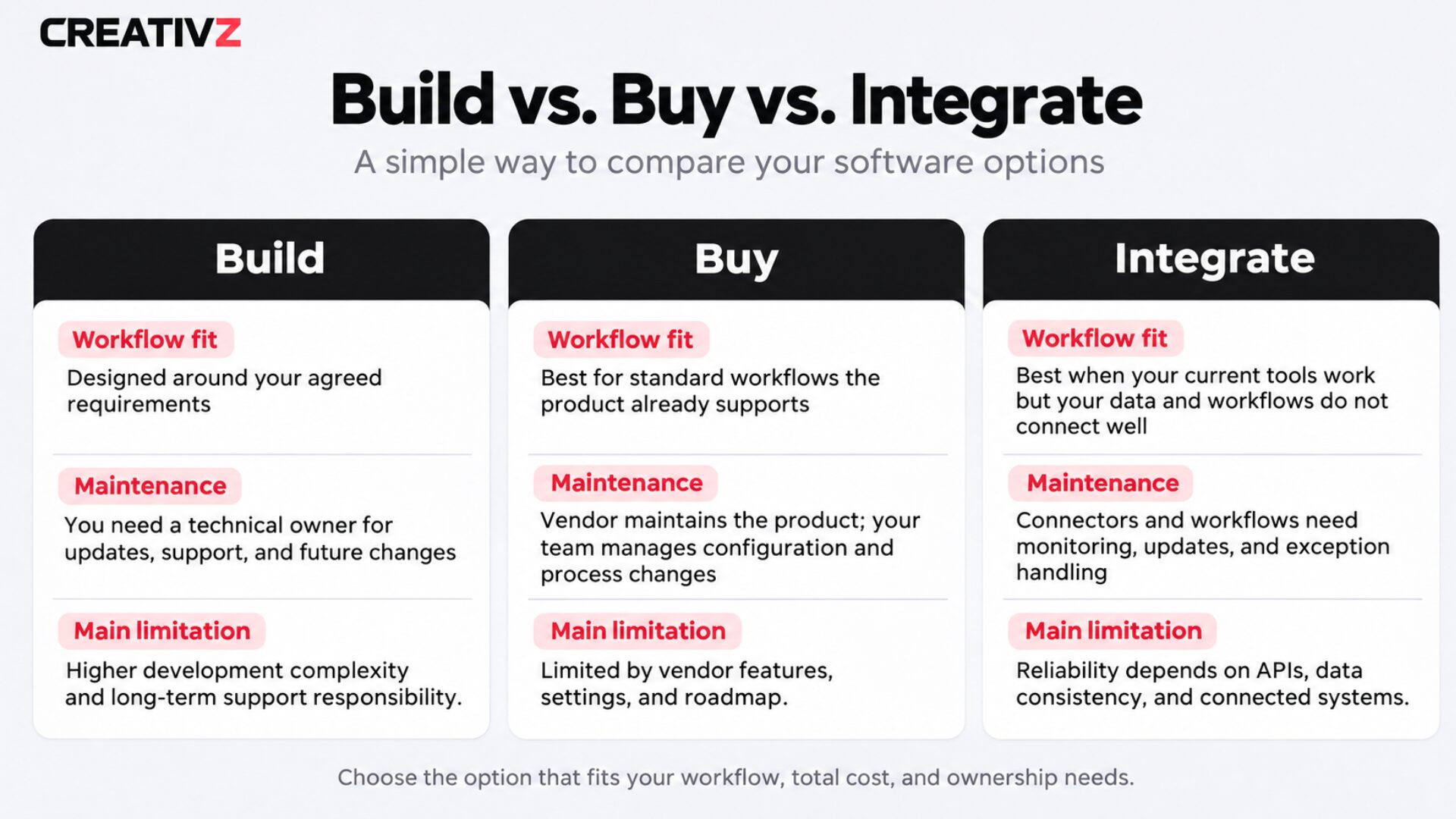
No option wins every row.
A custom application fits your workflow closely but adds ongoing maintenance for your team.
An existing product is faster to implement but asks you to adapt your process.
Integration protects what you already invested but depends on several platforms staying reliable and compatible.
Here are the three decisions with the biggest impact on your outcome.
1. Workflow Fit: When Options Supports Your Business Process?
Start with the workflow your software must support.
For standard tasks like contact management, task assignment, or basic invoicing, an existing product likely covers your needs already.
Building a custom system to copy those features adds development work you do not need.
Custom software earns a place when your process has requirements existing products fail to support.
Say you run a B2B service company, and your quoting process involves:
- Customer-specific contract terms
- Location-based pricing rules
- Approval requirements for unusual requests
- Service capacity checks
- Updates to customer and opportunity records
Your answer points to one of three paths:
- Buy if an existing product handles these requirements through configuration.
- Integrate if your current applications each do their job but do not share the right information.
- Build if your critical rules remain unsupported after you test configuration and integration options.
What to verify
Ask each vendor or developer to demo the hardest workflow your business runs. Include at least one exception. A general product demo does not prove the software fits how you operate.
2. Cost: Which Option Makes Financial Sense Over Time?
The price tag is only one part of what you pay.
An off-the-shelf product often comes with a manageable subscription. You still pay for onboarding, configuration, integrations, extra user licenses, and staff training.
Custom development covers discovery, design, engineering, testing, deployment, hosting, and ongoing maintenance. Integrations also need development, monitoring, and updates whenever a connected platform changes. Compare total cost over the same operating period, not the first quote.
Big projects show why. McKinsey research on more than 5,400 IT projects found large IT projects, those with initial budgets above $15 million, ran 45 percent over budget on average and delivered 56 percent less value than predicted. Your project is likely smaller. The lesson still applies: price the full scope before you commit.
What your estimate should include
|
Cost category |
Questions to ask |
|
Initial setup |
What work happens before your team uses the system? |
|
Licensing |
Are you charged by user, record, feature, or usage? |
|
Development |
What functionality needs design, build, and testing? |
|
Integration |
Which systems need to connect, and what access does each one need? |
|
Migration |
How will your existing data move into the new setup? |
|
Training |
What will your employees need to learn? |
|
Maintenance |
Who handles defects, updates, and compatibility changes? |
|
Exit costs |
How do you get your data back or move to another solution? |
Ask every provider to estimate costs over the same period, such as three years.
Use current written quotes and list every assumption. A single cost figure for all three options would mislead you, because scope varies widely between them.
When the investment pays off
Tie the investment to a defined business outcome, such as:
- Less repeated data entry
- A dependable approval workflow for critical decisions
- More reliable customer information
- A new digital product you plan to sell
Before you commit, name the current problem and the evidence you will use to judge improvement.
Say your team moves information between systems by hand. Measure the current workload and error rate before you introduce anything new.
Do not assume every minute of manual work disappears after launch.
3. Ownership: Who Maintains the Software After Launch?
Your custom application needs ongoing development, hosting, security maintenance, documentation, and technical support.
Ownership of source code and intellectual property depends on your contract. Custom-built does not automatically mean you own every component.
With off-the-shelf software, the provider handles product development and infrastructure under the service agreement.
You still own configuration, access management, data handling, and your own processes.
Integrations raise one more question for you. What happens when a connected platform changes its API or goes down? Our guide to workflow exception handling covers how to plan for these failures.
What to verify
Before you choose, get clear answers to these questions:
- Who owns or licenses the software and its components?
- Who controls your business data?
- Who maintains the integrations?
- How are failures detected and resolved?
- What documentation will you receive?
- What happens if the vendor relationship ends?
These answers matter as much as the feature list.
Unclear ownership turns a finished build into an orphaned system nobody maintains.
Two Business Scenarios: When Should You Build or Buy?

Choosing between custom software, an existing product, and integration becomes easier when you consider the business requirements behind each decision.
Let’s look at two common situations and which approach makes more sense.
Scenario A: Your growing B2B company needs a CRM
Spreadsheets no longer support your sales process.
You need contact records, opportunity stages, lead assignment, activity tracking, and basic reporting.
Your requirements are fairly standard, and an existing CRM handles them through configuration.
You also want to launch without hiring your own development team.
Recommended choice: Buy and configure an existing CRM.
A custom CRM would add engineering and maintenance work with no clear advantage for you.
Before you commit, test lead routing, reporting, data exports, and any integrations you need.
Assumption: The CRM you select supports your critical requirements, and the commercial terms work for you.
For a deeper look at CRM requirements, read our guide on how to set up a CRM built to support your sales.
Scenario B: Your service company has a specialized quoting process
Your customer requests move across several systems.
Pricing depends on project requirements, service availability, regional rules, and contract-specific approvals.
Your team builds quotes in spreadsheets, requests approvals by email, and updates customer records by hand.
You tested existing products and reasonable integrations. Important pricing and approval rules stayed unsupported.
Recommended choice: Build a focused custom quoting application.
Replacing your CRM or scheduling platform is not necessary.
A custom application supports your specialized rules while connecting to the systems you already use.
Keep the first release focused on your highest-priority quoting workflow, not a rebuild of your whole operation.
Assumption: Your requirements are verified, your current tools fail to support them, and the expected business benefit justifies development and maintenance.
Where integration fits
Now take a third situation.
You already have a CRM, scheduling platform, and reporting system you are happy with.
Your main problem is repeated manual entry between them.
If those platforms offer the right APIs and the workflow connects reliably, integration is your best option.
A replacement application would not solve a problem of better data connections.
Check what your current tools already do before you commit to new software.
What Could Change Your Software Decision?
A choice looking right in early research often changes after technical discovery.
An existing product seems sufficient until your team finds a required pricing rule the product does not let you configure.
A custom application looks attractive until the maintenance and security work becomes clear.
Integration seems simple until you review the platform’s API limits.
Let these findings shape your decision before you commit to implementation.
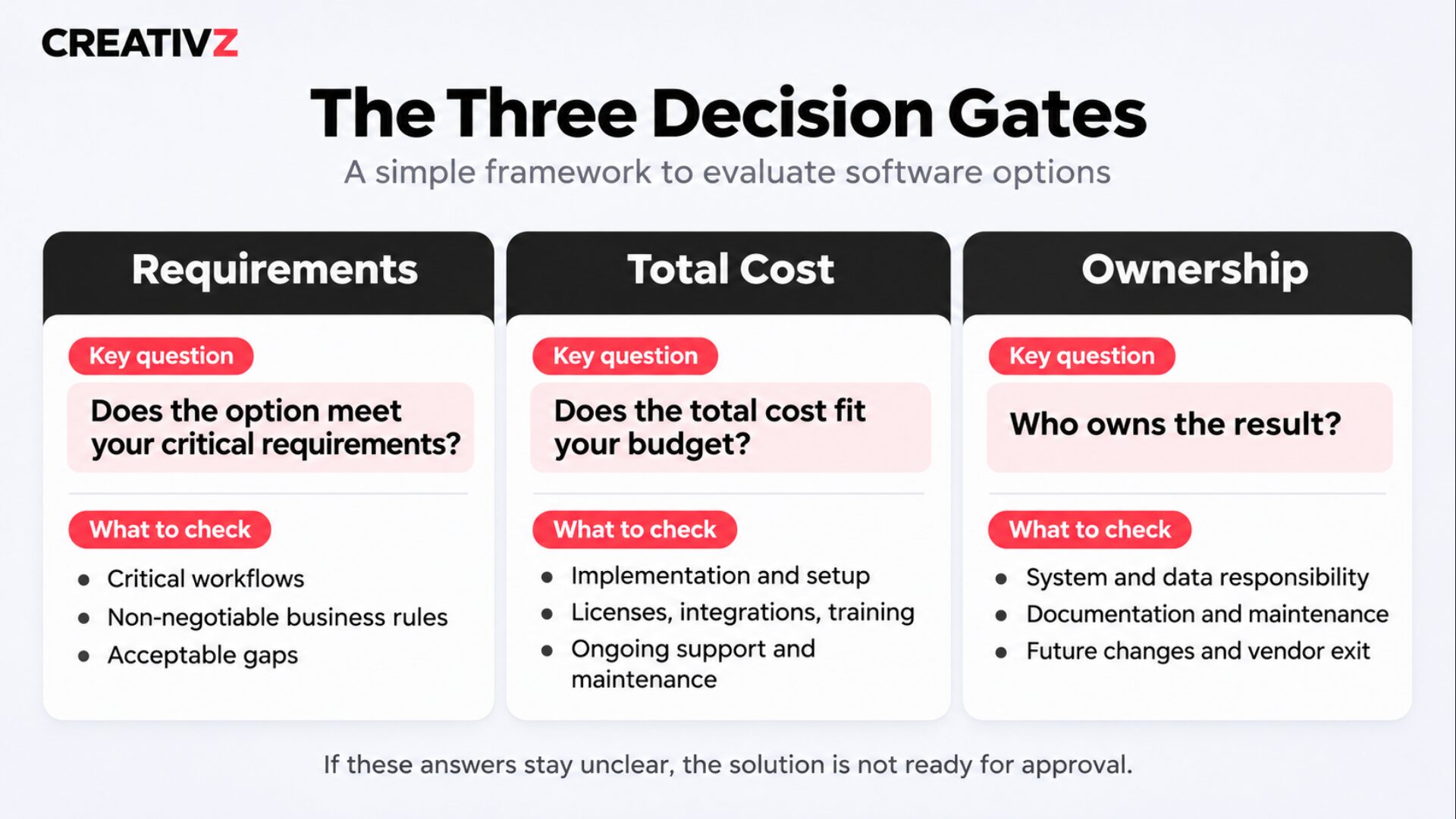
Use these three gates to narrow your options before comparing vendors, platforms, or development partners.
Gate 1: Does the option meet your critical requirements?
List the business rules and workflows you refuse to compromise on.
If an option fails to support them, decide whether the gap is acceptable or calls for another approach.
Gate 2: Does the total cost fit your budget?
Compare implementation, licensing, infrastructure, integration, training, and ongoing support over the same period.
Gate 3: Who owns the result?
Name who is accountable for the system, the data, maintenance, documentation, and future changes.
If these answers stay unclear, the solution is not ready for your approval.
Your decision rule
Buy when an existing product meets your critical requirements at an acceptable total cost.
Integrate when your current software works and the flow of information between systems needs fixing.
Build when important requirements stay unsupported and the business benefit justifies development and ongoing maintenance.
The right choice solves your verified problem without adding complexity you do not need.
Questions to Ask Before Before Choosing A Software Provider
Before you choose a vendor or development partner, ask this:
“Show us how your proposed solution handles our real workflow, including one exception, and explain what happens when something fails.”
Then follow up:
- Which capabilities are supported today?
- What needs extra development?
- What is excluded from the quote?
- Who maintains the system after launch?
Planning more automation? Run our Automation Readiness Audit before adding new technology.
If disconnected applications are your biggest problem, our article on integrated growth systems explains why fixing the connections often matters more than replacing tools.
Want to Go Deeper on Custom Software Development Solutions?
- Workflow Exception Handling: Why Automation Creates More Manual Work. What to build into any system so failures reach the right person with full context.
- Automation Readiness Audit: What to Fix Before Adding AI to Your Revenue System. The review to run before you build or buy anything new.
- Why Businesses Struggle to Scale. Why disconnected tools slow growth more than missing tools.
Final Thought: Choose The Right Solution For Your Business
Custom software pays off when you need capabilities existing products fail to provide.
Not every operational problem needs custom development.
You might need a proven product. You might need better integrations. Or you might need a focused application built around requirements standard tools do not support.
Start with your business process.
Find what is failing.
Test each option against your real requirements.
Then compare total cost, responsibilities, and expected outcome before you commit.
The right software solves your verified problem. Everything else is added complexity.
Want a second set of eyes? Let’s talk. We will review the workflow causing the most friction and help you decide whether to build, buy, or integrate.