
Home service lead generation is the process of attracting potential customers who need services such as HVAC repairs, plumbing, roofing, installations, or maintenance. Businesses generate these inquiries through Google Ads, Local Services Ads, referrals, and conversion-focused websites.
But here’s where things get complicated.
A campaign brings in 40 inquiries. Your marketing dashboard reports them as leads. Yet only a handful become appointments, and you’re not sure what happened to the rest.
Are they the wrong customers? Did someone miss a call? Did the estimate go unanswered? Or did your CRM fail to capture what happened next?
Before spending more to generate leads, you need to understand what happens to the ones you already have.
In this guide, we’ll cover:
- how to choose lead generation channels,
- identify qualified inquires,
- find gaps in follow-up and booking
- connect marketing activity to actual job outcomes

Which Home Services Lead Generation Channels Work for Each Type of Job?
The right channel depends on the service you provide. How urgent the customer’s problem is, and how the customer chooses a contractor.
Home service businesses often combine local search, paid ads, service-specific landing pages, referrals and existing customer relationships.
Each channel serves a different kind of customer.
If you sell urgent repairs: Be there when the customer needs help now
A homeowner searching for an emergency plumber isn’t looking for a month-long email sequence.
They need to know whether someone can fix the problem, serve their location, and respond within a reasonable time.
For urgent plumbing, HVAC, and electrical work, focus on:
- Your Google Business Profile and local SEO: Help customers find relevant providers in their area.
- Google Local Services Ads: Get a paid local placement if your trade is on Google’s list of eligible service categories.
- Google Search Ads: Reach people searching for the exact repair you offer.
- Mobile-friendly service pages: Let visitors understand your offer and call you in one tap.
Google ranks local results mainly on relevance, distance, and prominence. You can see more details on their local ranking guidance. Keep your profile accurate so Google matches you to the right searches.
Showing up here is half the job. If your visitors hunt for your phone number, fail to find your service area, or face too many steps to request help, they call the next company instead.
Our article on why your website is not converting covers the most common barriers.
Ask yourself: Do people find you when they need help now, and do they reach you without friction?
If you sell planned installations: Help your customer decide
A roof replacement or HVAC installation is different from an emergency repair.
Customers may request several estimates, compare materials, review past projects and discuss pricing before choosing a contractor.
Give your customer what the decision needs:
- Service pages built around the exact work you install
- Search campaigns aimed at installation and replacement searches
- Landing pages explaining your service and your estimate process
- Paid social campaigns introducing you to the right local audience
- Project photos, reviews, and other proof of your completed work.
Your website should tell visitors what you provide, which areas you serve, and what happens after they request an estimate.
Say you run a roofing company. Visitors land on your page after searching for replacement options. Your page still has to give them a reason to book an inspection with you.
Ask yourself: Does your marketing answer the questions your customers ask before they book?
If you sell maintenance and repeat work: Go back to your own customers
Some home-services businesses focus so heavily on finding new customers that they overlook existing ones.
An HVAC customer may need seasonal maintenance. A plumbing customer may contact the business again for another repair. A satisfied homeowner might recommend a contractor to a neighbor.
Reach these customers with:
- A referral program
- Maintenance reminders
- Permission-based email or SMS follow-ups
- Repeat-service campaigns
- Review and reputation management
You need accurate customer records and the right communication permissions for each of these. You also need room in your schedule.
Sending reminders to hundreds of customers backfires when your calendar has no open slots. Read our guide on capacity planning for service businesses before you push demand.
Why this matters to you: The right channel matches how your customers buy and how much work your team handles.
Should You Buy Leads or Build Your Own Home Services Lead Generation Channels?
Buying leads can provide access to existing customer demand. Building your own channels gives you control.
Neither approach is automatically better. The right choice depends on your budget, the quality of available inquiries, your local market, and how much control you need over the acquisition process.
If you buy leads from a third-party provider
Lead marketplaces connect you with homeowners looking for your services.
Some sell the same lead to several contractors. Others sell you exclusive leads under their own terms.
Before you sign up, ask the provider:
- Is this lead shared with other contractors?
- How do you verify the customer’s service needs?
- What information will I receive?
- How fast will the lead reach my team?
- What happens if the contact details are wrong?
- Will I be able to track which leads become booked jobs?
- What proof of consent do you have for outreach?
A lower price per lead is not always a better deal for you.
A lead outside your service area, or a customer who never picks up, is worth close to nothing to your business.
If you build your own channels
Your website, search visibility, landing pages, and referral program are assets you own and grow over time.
Your paid campaigns also send leads to pages and processes you control.
You decide what message customers see, what information you collect, and what happens after a lead arrives.
Building these channels takes investment from you.
SEO takes ongoing work. Ads need management and spend. Your website needs maintenance, tracking, and regular conversion fixes.
Compare every provider and channel by the quality of jobs they bring you, your ability to track outcomes, and your total Customer Acquisition Cost.
Never choose on the advertised price per lead alone.
How Do You Spot a Qualified Lead In Home Services Lead Generation?
A qualified lead is a reachable customer who needs work you provide, inside the area you serve, at a time your team has room for. A filled-out form does not make someone your customer.
Say you run an HVAC company and launch an installation campaign.
You get homeowners wanting new systems. You also get people wanting small appliance repairs, and people living outside your service area.
Your ad dashboard counts all three as leads. Only one group is the business you wanted.
Check each new lead against five questions:
|
What to check |
Question to ask |
|
Service fit |
Does the customer need a service you provide? |
|
Location |
Is the property inside your service territory? |
|
Contactability |
Is the customer reachable by phone or email? |
|
Job requirements |
Does the work match your skills and equipment? |
|
Availability |
Does your schedule have room for the job? |
Adjust these questions to your trade.
As a roofer, you need the property type and the inspection requested. As a plumber, you care most about urgency and location. As an HVAC installer, you need equipment details and project scope.
Your answers show you what each channel sends you.
If a campaign keeps bringing you requests from outside your area, fix your targeting. Suitable leads with no follow-up point to a different problem inside your team.
Lead quality and lead handling are two different problems. Measure each one before you change your marketing.
How Much Does Home Services Lead Generation Cost You?
Your costs depend on your trade, your market, your competition, your channels, and the jobs your customers request.
An emergency plumbing call and a roof replacement estimate carry different economics for your business.
Skip the industry benchmarks. Start with the numbers you already have.
Track three types of costs
-
- Acquisition spend
Your ad budget, purchase leads, and other expenses tied directly to getting leads. - Marketing and management costs
Your campaign strategy, creative production, agency fees, SEO work, and landing pages builds. - Technology and implementation costs
Your CRM, call tracking, integrations, automation, and reporting tools.
- Acquisition spend
Keep these three separate. You will see where your money goes and what each investment is meant to achieve.
Look past your cost per lead
Say you run two campaigns with the same ad budget.
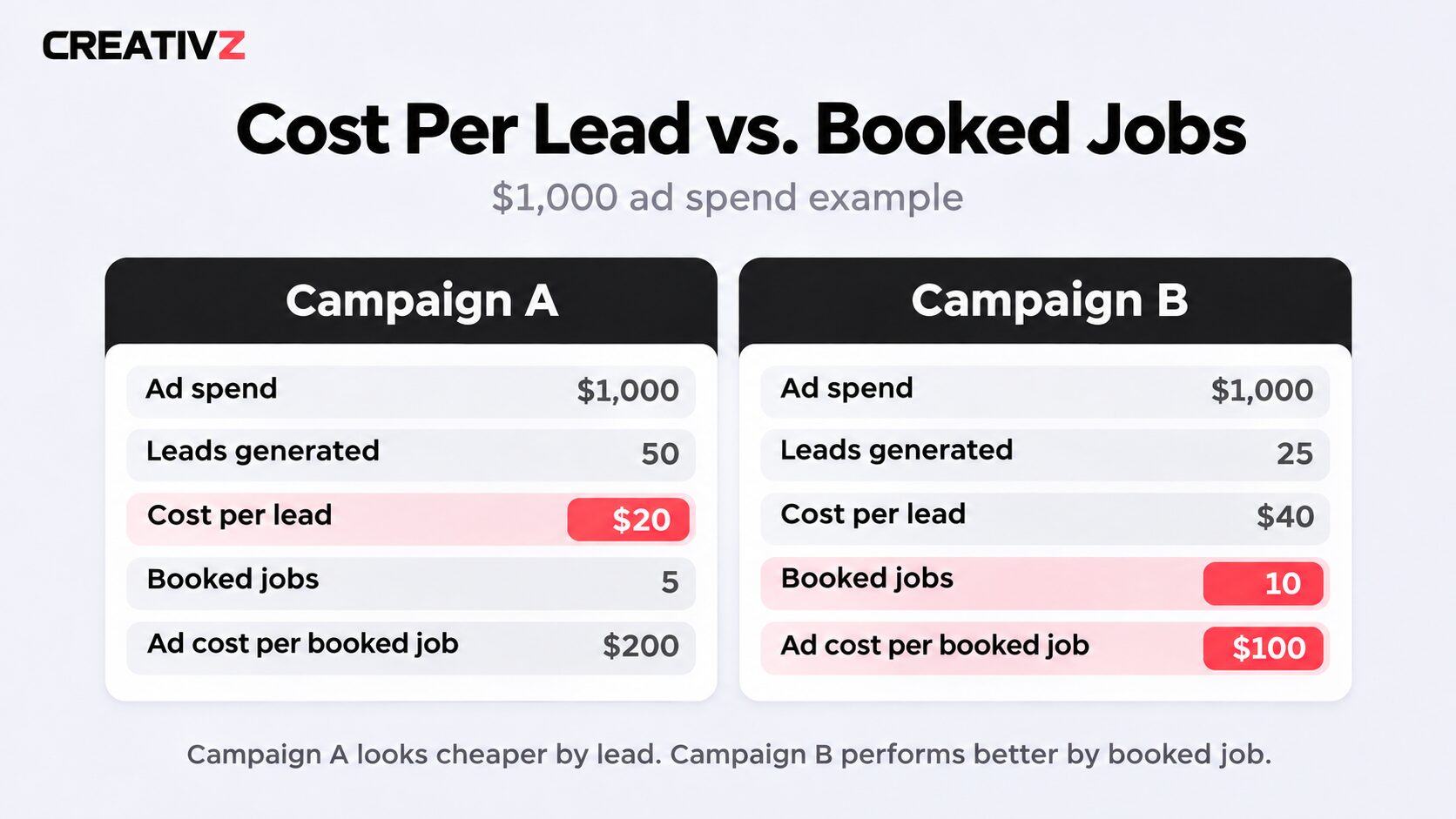
Illustrative example only. These figures are not Creativz client results or industry benchmarks.
Campaign A looks cheaper on your dashboard.
Campaign B fills twice as many slots on your calendar for the same spend.
You still do not know your profit. For profit, you need completed jobs, revenue, operating costs, cancellations, and other expenses.
Pick the number matching the decision in front of you:
- Want more leads? Track cost per lead.
- Want more booked jobs? Track cost per booked job.
- Want profitable growth? Track the economics of completed work.
A cheap lead is not a cheap job. Your cost per booked job shows which campaign deserves your budget.
Why Your Home Services Lead Generation Is Not Producing Booked Jobs
Your leads stall for four main reasons. The lead is a poor fit, the customer is unreachable, your schedule is full, or your follow-up breaks down.
Each reason needs a different fix. Here is how each one looks inside your business.

Scenario 1: A customer calls while your team is busy
A homeowner calls about a plumbing repair while your dispatcher is on another call.
The missed call sits in your phone system. Nobody on your team owns the callback.
Your marketing did its job. The lead arrived. What you are missing is a clear process for unanswered calls.
Speed decides the outcome here. Harvard Business Review research found companies contacting a web lead within an hour were nearly seven times as likely to qualify the lead as companies responding an hour later.
Our guide to building a lead response system shows you how to close this gap.
Scenario 2: Customers ask for work you do not offer
Your HVAC business keeps getting requests for services you do not provide, or from areas you do not cover.
Your campaign generates leads, but your targeting does not match your business.
More follow-up will not fix this. Your acquisition strategy needs review.
Scenario 3: Your estimate has no next step
You visit a property and send a roofing estimate.
Your customer has not said yes or no. Nobody on your team recorded who follows up or when. The job sits in limbo.
A consistent CRM process fixes this. Our guide on how to set up a CRM for your sales process walks you through the setup.
Do not blame your marketing for every unbooked lead. Find out what stopped the lead first.
How to See Which Home Services Lead Generation Channels Bring You Real Jobs
To know which channels earn their budget, connect each lead to its qualification status, booking, job outcome, and revenue. Your ad dashboard alone will not tell you this.
Track each lead through six stages:
|
Stage |
What you record |
|
Lead |
Source, date, requested service, contact details |
|
Qualification |
Service fit, territory, status, reason for disqualification |
|
Follow-up |
Assigned owner, contact attempts, next action |
|
Booking |
Appointment or estimate, scheduled date, linked lead |
|
Job outcome |
Completed, canceled, or other status |
|
Revenue |
Job value, invoiced amount, or collected revenue, kept separate |
Say you run a plumbing company and receive 60 leads. Google Ads shows which of those leads came from your ad campaign.
Your booking system tells you about appointments, cancellations, and completed visits. Without a link between the two, you know what your ads cost but not which leads became paying jobs.
A connected CRM and reporting setup closes this gap, as long as your team records the data the same way every time.
If your numbers never line up, read why CRM reporting does not always match what happens in your business.
Accept the limits of attribution
Some customer journeys will always be messy.
A homeowner finds you on Google, comes back through an ad, and later calls you directly. Repeat customers’ books using your number saved in their phone. Some of your jobs get entered by hand with no marketing source.
Each of these leaves gaps in your data. Use your reports to see what the evidence shows and where data is missing. Do not credit one channel with every job.
Lead-to-job reporting shows you which channel earns more budget and which one only fills your dashboard.
Is Your Home Services Lead Generation Working? Check 20 of Your Own Records
Before you raise your marketing budget, look at what happens to the leads you already have.
You do not need a new dashboard for this.
You need your recent leads, your booking data, and the people on your team who handle them.
Step 1: Pull ten recent leads
Pick ten recent requests. Include booked and unbooked ones.
For each lead, answer:
- Where did this lead come from?
- What service did the customer ask for?
- Was the customer inside your service area?
- Who on your team owned the request?
- Did anyone record a response or contact attempt?
- What happened next?
An unbooked lead is not always a lost job.
Some are duplicates, outside your area, or a poor fit for your business.
Write down the reason for each one.
Step 2: Pull ten recent booked jobs
Pick ten recent bookings and check:
- Do you have the original lead on record?
- Is the marketing source recorded?
- Which employee or location handled the booking?
- Was the job completed or canceled?
- Is the job value recorded?
- Does the booking link back to a campaign or channel?
Step 3: Find your pattern
Compare your findings with this table.
|
If you find |
Look at |
|
Many leads do not match your services |
Your campaign targeting and qualification |
|
Leads have no assigned owner |
Your routing and responsibilities |
|
Contact attempts are missing |
Your response and follow-up process |
|
Bookings have no original lead record |
Your CRM and booking integration |
|
Revenue records do not link to jobs |
Your reporting and data connections |
|
Locations count leads differently |
Your reporting rules across branches |
Twenty records will not give you a statistically reliable conversion rate.
The check gives you a fast read on where to look next.
If you run several locations, repeat the check at each branch. Compare how each team records leads and bookings.
Fix the biggest gap you find before you add another tool.
When Your Home Services Lead Generation Needs Marketing and Technology Working Together
Your leads move through two worlds. Marketing brings them in. Your systems handle them, track them, and record the result.
When the two do not connect, you feel the gap.
You have strong local visibility, but your website makes booking hard. Or your landing pages convert, but nobody knows who owns each new request. Or your team is capable, but your reports never agree.
Creativz works on both sides of this gap. We combine performance marketing, software engineering, automation, and analytics, so your acquisition, CRM, integrations, and reporting work as one system.
We start with your goals, not our services:
- Which customers do you want more of?
- Which services do you want to grow?
- How does your team handle leads today?
- What do you need to know to make better decisions?
From there, we help you pick the marketing, technology, and process changes worth making.
Another campaign will not fix every problem. Neither will another app.
Sometimes you attract the wrong customers. Sometimes your booking process needs work. Sometimes your systems do not talk to each other.
Your marketing and your systems should work toward the same outcome: booked, completed, paid jobs.
Want to Go Deeper on Home Services Lead Generation?
- Speed to Lead: How to Cut Response Time From 3 Hours to 12 Minutes. Build a response system so no call or form sits unanswered.
- Capacity Planning for Service Businesses. Match your marketing demand to the jobs your team has room to take.
- Why Your CRM Reporting System Does Not Match Reality. Close the gap between leads logged and jobs completed.
Final Thought: Know What You Want to Fix Before You Spend More
More names in your CRM will not fill your schedule.
Your growth comes from attracting customers who need your work, knowing what each one costs you, and tracking whether your leads turn into booked and completed jobs.
Before you raise your budget, answer three questions:
- Do your channels reach customers who match your services and service area?
- Do you know what happens after those customers contact you?
- Are you able to connect your marketing spend to real job outcomes?
If any answer is unclear, start there.
Your fix usually sits in one of four places: your acquisition strategy, your website or booking experience, an internal process, or the connection between your systems.
Want a second set of eyes? Start with a Digital Growth Audit. We will walk through how your leads move from first contact to booked job, and show you where the gaps are.